Pageoptimized
Module 04

Technical SEO

Diagnose discovery, rendering, indexation, canonicalization, structured data, sitemap, and performance problems with page-level evidence.

  • SEO specialists
  • Developers
  • Site owners
  • Agencies
Module case file

Horizon Legal has a 70% health score, but the score is not the diagnosis

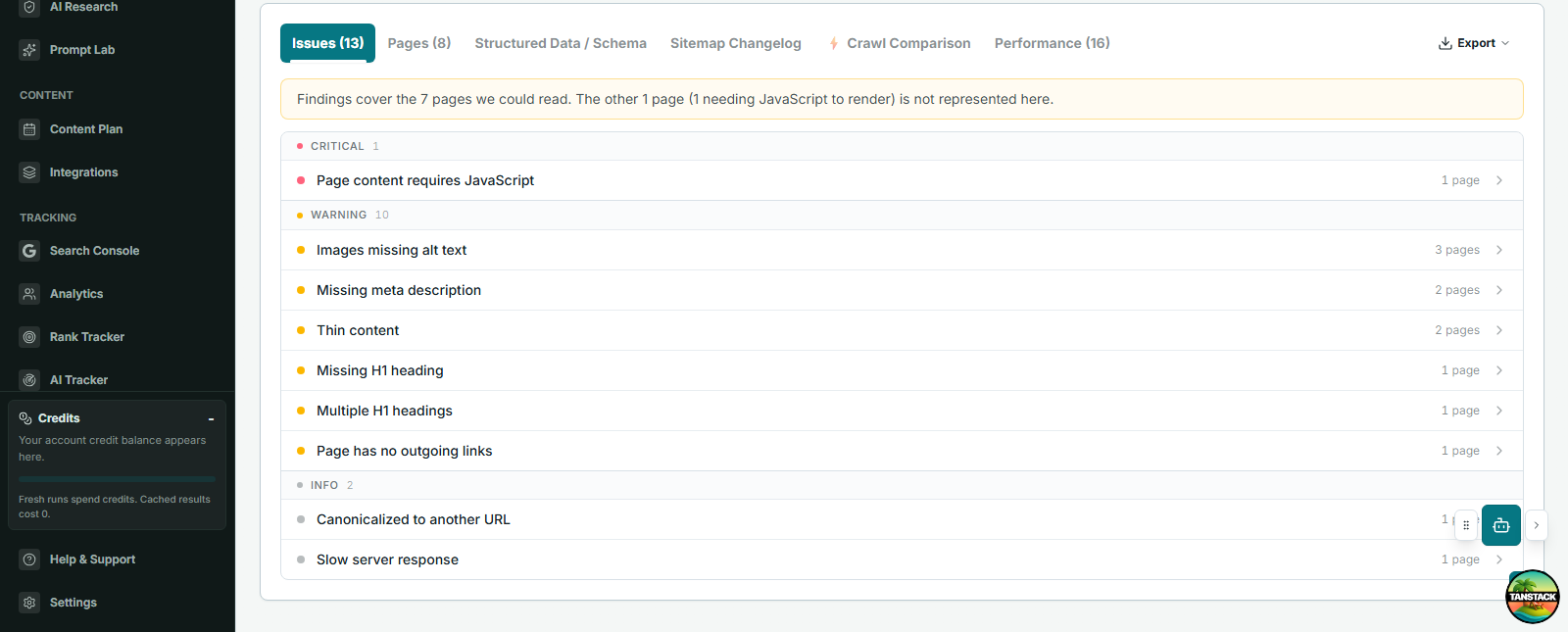
The August 21 crawl sampled eight pages, read seven, found one critical issue and ten warnings, and recorded an 801 ms average response. You must turn that evidence into a verified remediation queue.

Crawl scope
8 sampled pages; 7 readable
Health
70%; 1 critical, 10 warnings, 2 informational
Critical finding
One page requires JavaScript to expose content
Known issue
12 internal links return 404
Your finished deliverable

Group findings by root cause, identify affected important URLs, assign acceptance criteria, and recrawl the same scope after release.

Lesson 4.1

Define crawl scope and identity

Know what was tested before interpreting a health score.

Why this matters

A crawl is a sample produced by a start URL, limits, discovery mode, user agent, and access conditions. Scope belongs in every conclusion.

Build yours

  1. Choose the correct property and start URL.
  2. Set page scope and discovery mode.
  3. Record crawler identity and access limitations.
  4. Verify robots, sitemap, and representative templates.
Completed example: Horizon Legal

Reproducible crawl record

The scope explains exactly what the 70% score represents.

Finished output

Start URL
https://horizonlegal.com/
Crawler
Googlebot Desktop; balanced discovery
Sample
8 pages attempted; 7 read
Access limit
One JavaScript shell returned no readable page content
Run
Aug 21, 2026 at 11:19 AM
Decision

Describe findings as an eight-page sample, then rerun the same settings after the rendering fix.

Save this in

Site Health audit record; link the run from the technical queue.

Before you move on

  • Scope is reproducible.
  • Blocked or unrendered pages are named.
  • A sample is not described as the entire site.
Lesson 4.2

Audit indexation and canonical controls

Separate discovery, crawlability, indexability, and canonical selection.

Why this matters

Robots controls, status codes, canonical signals, redirects, and internal links solve different problems. Combining them into an 'index issue' hides the fix.

Build yours

  1. Check status and redirect chain.
  2. Check robots.txt and page-level robots directives.
  3. Compare declared and selected canonical evidence.
  4. Verify internal links and sitemap inclusion.
  5. Inspect representative URLs in Search Console.
Completed example: Horizon Legal

Index-control check for an old results page

Each control is checked separately before choosing a fix.

Finished output

Status
200; no redirect
Robots
Crawl allowed; no noindex recorded
Canonical
Self-declared
Internal links
None found
Search demand
No clicks in 90 days; overlaps the case-results page
Decision

Merge useful proof into the case-results page, redirect the old URL, and update internal references.

Save this in

Work Queue: Consolidate old results page, with source and destination URLs.

Actual product

Inspect page-level evidence

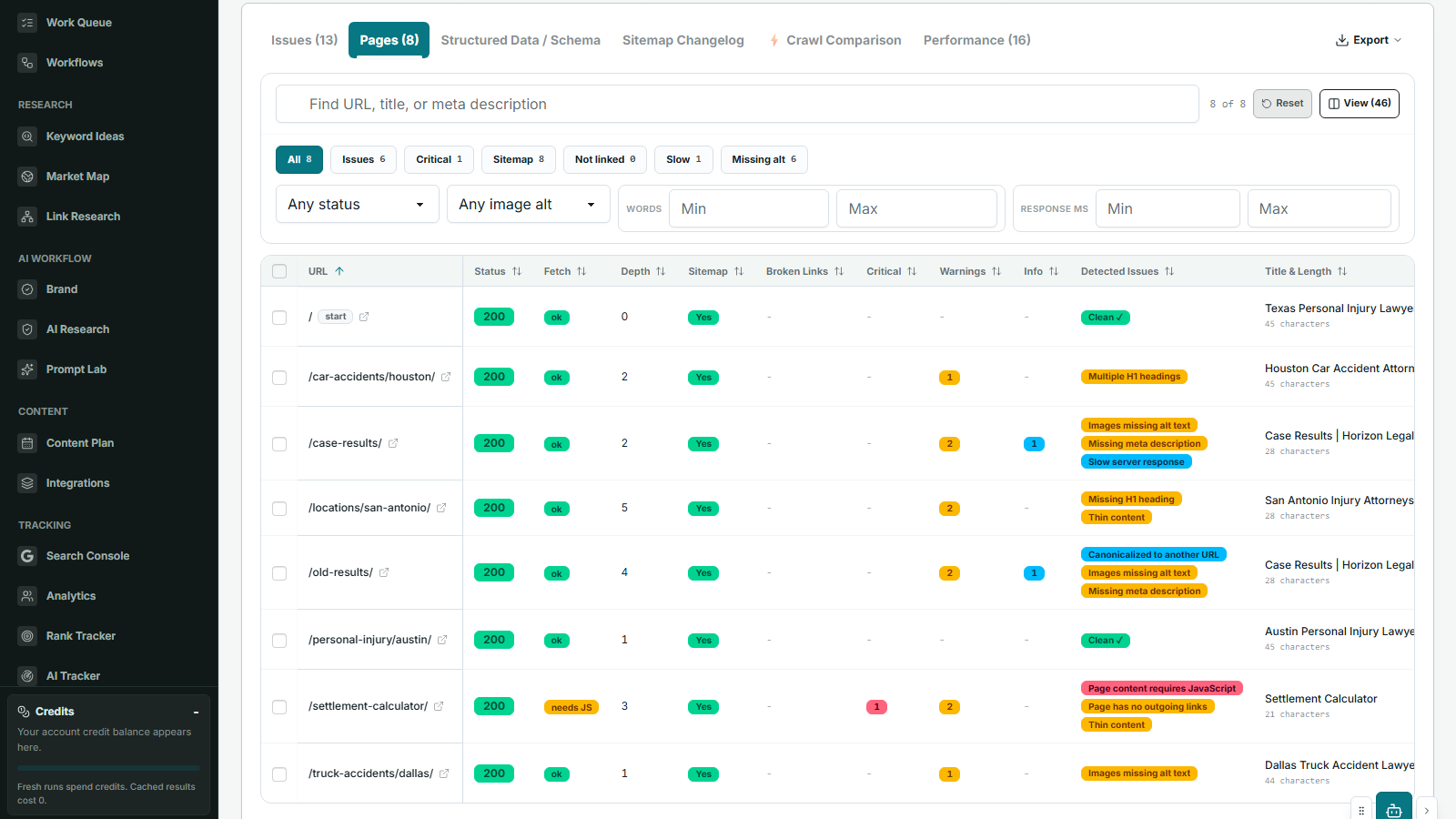
The Pages view exposes status, indexability, titles, canonicals, content, and template patterns needed to verify a diagnosis.

PageOptimized Site Health pages tab with crawl status, metadata, canonical, and indexability details.Open full size
  1. Filter the affected template.
  2. Compare page controls.
  3. Check important outliers.
  4. Save the root cause, not every symptom.

Before you move on

  • Each issue names the failed control.
  • Canonical conflicts have URL evidence.
  • Fixes avoid blocking pages that must be crawled to see noindex.
Lesson 4.3

Review rendering, performance, and structured data

Find user-facing and machine-readable failures without assuming JavaScript is invisible.

Why this matters

Search engines can render JavaScript, but blocked resources, errors, slow delivery, or client-only content can still cause failures. Structured data must match visible content and an eligible documented feature.

Build yours

  1. Compare initial HTML and rendered content on important templates.
  2. Check resource access and JavaScript errors.
  3. Review Core Web Vitals and lab diagnostics as separate evidence.
  4. Validate structured data syntax, eligibility, and visible-content agreement.
Completed example: Horizon Legal

Rendering and structured-data finding

The finding names the failure and the affected experience.

Finished output

Affected page
One audited URL
Initial HTML
Empty application shell
Rendered result
Crawler could not obtain readable page content
Performance context
73 average Lighthouse performance; 801 ms response
Schema rule
Validate only markup matching visible content
Decision

Serve essential content in initial HTML, then recrawl and validate rendered content and schema.

Save this in

Technical queue root cause: Client-only content on important template.

Before you move on

  • The claim is based on rendered evidence.
  • Performance work names the affected experience.
  • Schema is not presented as a general ranking boost.
Lesson 4.4

Prioritize, assign, and recrawl

Turn technical findings into verified outcomes.

Why this matters

Issue count is not priority. Prioritize by affected important pages, severity, recurrence, effort, and confidence, then verify after release.

Build yours

  1. Group identical root causes.
  2. Attach affected important URLs and evidence.
  3. Assign fix owner and acceptance criteria.
  4. Recrawl the same scope after release.
  5. Close only when the evidence changes as expected.
Completed example: Horizon Legal

Prioritized remediation queue

Counts are grouped into fixes with acceptance criteria.

Finished output

P1
Render readable content on the failed page; owner Engineering
P1
Repair 12 internal 404 links; owner Web team
P2
Add 2 missing descriptions and 3 image alt values; owner Content
Acceptance
Same eight-page scope reads 8 of 8; affected issue counts reach zero
Review
Recrawl after Sep 2 release
Decision

Ship root-cause fixes first; close tasks only after the matched recrawl changes the evidence.

Save this in

Work Queue items linked to the Aug 21 Site Health run and Sep 2 verification run.

Actual product · five audit views

Start with issues, then inspect the affected pages

Site Health keeps severity, affected URLs, crawl context, and the fix path together instead of ending with an export.

PageOptimized Site Health issues tab showing technical SEO findings grouped by severity and affected pages.Open full size
  1. Confirm crawl scope.
  2. Open a grouped issue.
  3. Inspect affected important pages.
  4. Assign and recrawl after the fix.

Before you move on

  • Root causes are grouped.
  • Acceptance criteria are testable.
  • The before-and-after scope matches.
Primary references

Verify the practice at the source.

Practices and source links reviewed August 2026.