Pageoptimized
Module 10

AEO and GEO without myths

Improve accessibility, clarity, evidence, and source eligibility for search and AI experiences without inventing files, chunk formulas, or citation guarantees.

  • Business owners
  • SEO specialists
  • Content teams
  • Agencies
Module case file

Northstar CRM needs AI access and answer checks without folklore

The team wants visibility in answer engines. The work begins with accessible, useful pages and explicit crawler controls, then tests real prompts and agentic tasks without claiming a magic file creates citations.

Site
northstarcrm.example
Critical path
Pricing, security, migration, comparison pages
Controls
robots.txt, authentication, WAF, rendered content
Test types
AI answer view and agentic browsing task
Your finished deliverable

Build a crawler matrix, run a reproducible browsing test, and report only observed access, mentions, citations, and task completion.

Lesson 10.1

Use the same strong foundation

Start with accessible, indexable, useful pages rather than an AI-only optimization checklist.

Why this matters

For Google AI features, established SEO fundamentals remain the foundation. There is no required llms.txt file, special AI schema, or prescribed paragraph chunk length.

Build yours

  1. Verify crawl and index controls.
  2. Make the primary information available in rendered text.
  3. Use clear organization for people.
  4. Support consequential claims with attributable evidence.
  5. Keep important information current.
Completed example: Northstar CRM

AI discovery foundation check

The team verifies useful, accessible pages before inventing AEO-only work.

Finished output

Critical pages
Pricing, security, migration, comparisons
Access
200 status; meaningful HTML; public without authentication
Content
Clear claims, named sources, dates, and product evidence
Structure
Descriptive titles, headings, links, and supported schema
Decision

Fix weak or inaccessible source pages before adding any answer-engine tracking layer.

Save this in

Site Health and content QA record for the critical-page set.

Before you move on

  • No undocumented requirement is presented as fact.
  • Changes improve the human experience too.
  • Claims and dates are reviewable.
Lesson 10.2

Build a crawler and control matrix

Distinguish search discovery, user-requested retrieval, training, and rendering controls.

Why this matters

Crawler names do not all represent the same product or purpose. Record official documentation, robots token, user agent, purpose, access result, and verification method separately.

Build yours

  1. List only products relevant to the organization.
  2. Use official crawler documentation.
  3. Separate search/discovery from training controls.
  4. Verify user agents and published IP methods where available.
  5. Test WAF, robots, status, and rendered access independently.
Completed example: Northstar CRM

Crawler control matrix

Each crawler and site control is recorded instead of assuming one robots rule covers all behavior.

Finished output

Googlebot
Allowed on public content; sensitive paths disallowed
OAI-SearchBot
Allowed on public product and editorial pages
GPTBot
Policy decision recorded separately from search inclusion
Other controls
Authentication and WAF tested; robots is not access control
Decision

Keep crawler purpose, robots directive, HTTP result, rendered result, and review date in separate columns.

Save this in

Project crawler matrix, owner Security and SEO, reviewed Aug 27.

Before you move on

  • Every crawler has a documented purpose.
  • Training controls are not described as search controls.
  • Access conclusions have logs or reproducible tests.
Lesson 10.3

Test AI view and agentic browsing

Check whether a user or agent can perceive and operate the important experience.

Why this matters

Agentic access depends on more than crawler permission. Semantic structure, labels, keyboard operation, stable states, clear errors, authentication boundaries, and safe confirmations affect whether tasks can be completed.

Build yours

  1. Inspect the rendered information available without hidden interaction.
  2. Check headings, landmarks, labels, names, roles, and states.
  3. Complete the primary path with keyboard and accessibility semantics.
  4. Document authentication, paywall, consent, and destructive-action boundaries.
  5. Record failures as user-experience and automation-readiness issues, not ranking guarantees.
Completed example: Northstar CRM

Agentic browsing test

The test records whether an agent can complete a real public task, not merely load the homepage.

Finished output

Task
Find the Team plan price and whether SSO is included
Environment
Named browser agent; logged out; desktop; Aug 27
Observed path
Homepage -> Pricing -> Security
Result
Price found; SSO answer required a second page
Failure
Pricing table labels were not exposed as accessible text
Decision

Fix the accessible pricing labels, rerun the same task, and record completion time and answer accuracy.

Save this in

Work Queue: Agentic pricing-path accessibility, with before and after session evidence.

Actual product

Keep prompt evidence and sources visible

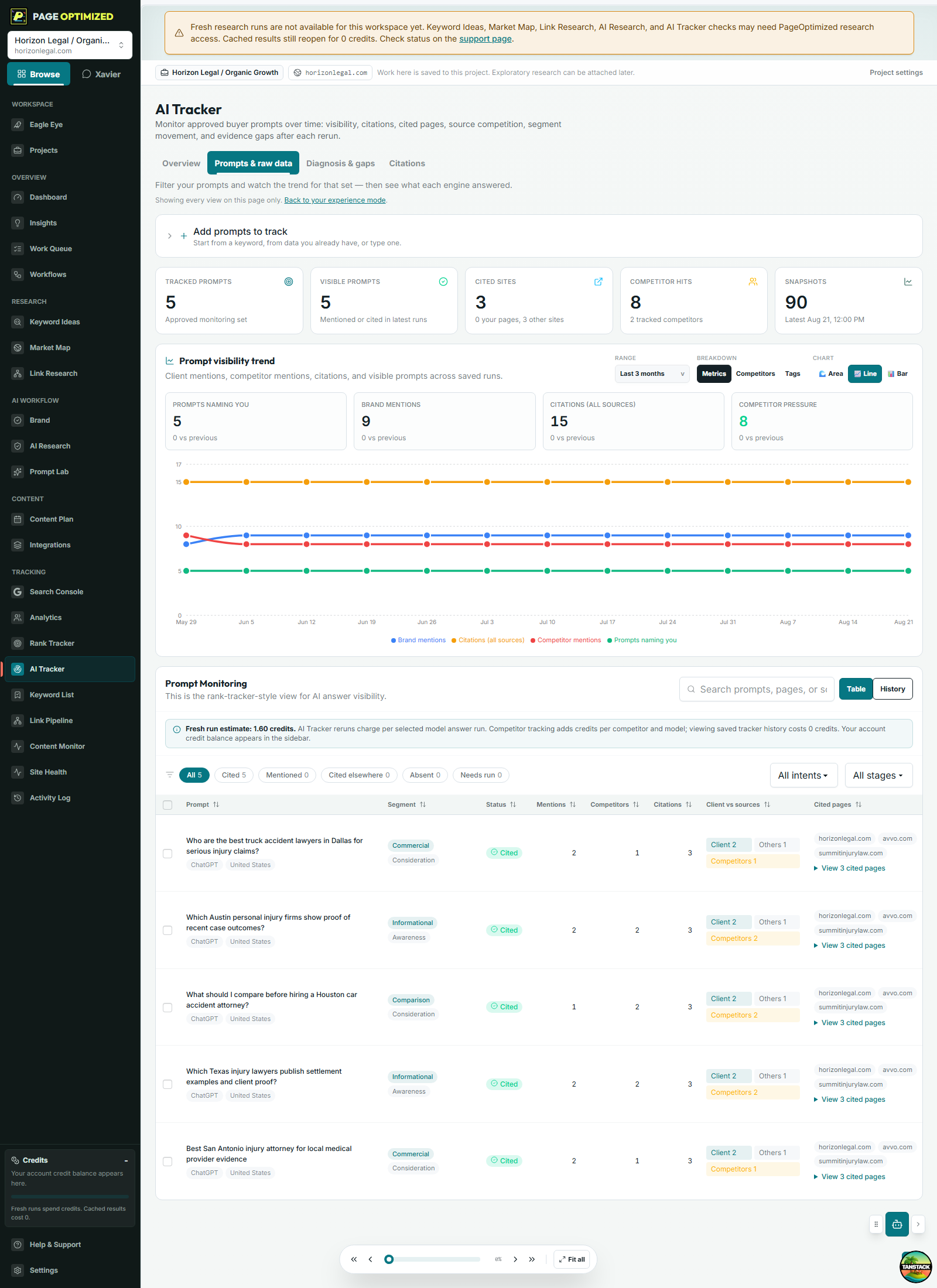
AI Tracker stores the prompts, runs, responses, mentions, citations, competitors, and source gaps needed for a reproducible observation.

PageOptimized AI Tracker prompts view showing tracked prompts, engines, mentions, citations, competitors, and run history.Open full size
  1. Approve the prompt and protocol.
  2. Record repeated runs.
  3. Inspect the response and sources.
  4. Create only evidence-backed follow-up work.

Before you move on

  • Important controls have accessible names.
  • Task state and errors are understandable.
  • Sensitive actions require explicit confirmation.
Lesson 10.4

Use honest evidence language

Separate an observed answer from a causal explanation.

Why this matters

AI responses vary by engine, model, mode, date, location, personalization, and source availability. A result is an observation under a protocol, not proof of a universal system rule.

Build yours

  1. Record prompt, engine, mode, date, location, and account state.
  2. Save the answer and cited sources.
  3. Classify mention, recommendation, accuracy, and citation separately.
  4. List plausible explanations and verification steps.
  5. Assign confidence and a retest schedule.
Completed example: Northstar CRM

Evidence-safe finding

The wording says what the test observed and stops before unsupported causation.

Finished output

Unsupported
Adding a special file will make AI engines cite us
Observed
Engine X cited the migration guide for 3 of 10 fixed prompts on Aug 27
Plausible
The guide's sourced comparison may make it useful to that answer
Unknown
Why the engine selected it in any individual response
Decision

Report prompt-level observations and source coverage; never promise inclusion or causation.

Save this in

AI Tracker finding with prompt, engine, mode, date, response, citation, and accuracy.

Before you move on

  • Protocol is reproducible.
  • Citation and accuracy are separate.
  • The report avoids deterministic causal claims.
Primary references

Verify the practice at the source.

Practices and source links reviewed August 2026.