
Work through these in order. The first two cover the large majority of cases.
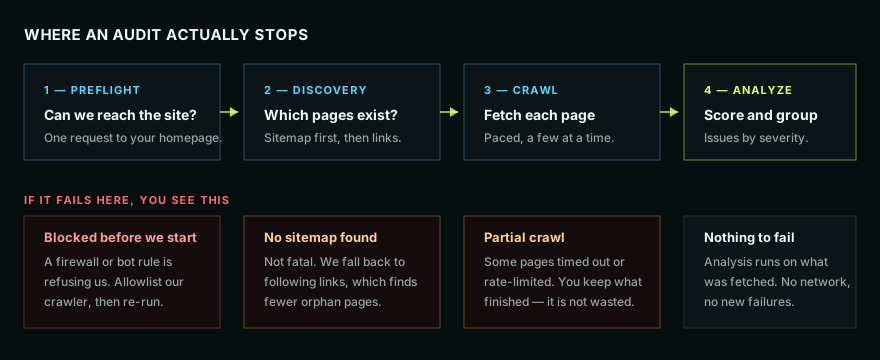
1. Something is blocking our crawler
By far the most common cause, and it usually looks like a run that fails immediately or gets a handful of pages and then nothing but errors.
Firewalls, bot-protection services, and some hosts refuse requests from crawlers they do not recognize. Your site is fine; it just will not talk to us.
How to tell: the site loads perfectly in your browser, but the audit fails at once or every page after the first few errors out.
Fix: allowlist our crawler in whatever sits in front of your site — Cloudflare, your WAF, your host's security plugin, or a rate-limiting rule. If you are not sure what is in front of your site, ask your host whether bot filtering is enabled.
2. You hit a page limit
Check the limit you set when starting the run, and your plan's monthly page allowance. An audit that stops at a round number stopped because you told it to.
3. No sitemap, so we could only find linked pages
Not an error, and the report says so. Without a sitemap we follow links from the homepage, which finds everything that is linked and nothing that is not.
Fix: publish a sitemap, or accept that orphan pages will be missing — and treat "these pages are orphaned" as a finding worth acting on.
4. Your server slowed down or rate-limited us
We crawl deliberately slowly, but shared hosting under load can still start refusing or timing out.
How to tell: a partial crawl where earlier pages succeeded and later ones failed.
Fix: re-run with a smaller page limit, or at a quieter time of day. You keep everything that finished — a partial audit is a real report on the pages it reached, not a wasted run.
5. The URL itself is wrong
Check the project URL for a typo, an http that should be https, a www mismatch, or a redirect to a completely different domain.
What not to do
Do not re-run the same audit repeatedly hoping it works. If a firewall refused us, it will refuse us again, and each attempt costs you crawl allowance.
Still stuck
Open a ticket from inside the app. It arrives with your project attached, so support can see which stage failed and what the errors actually said, without asking you to reproduce anything.
Next
- How a site audit works, and where it can stop
- Why my site audit stopped early